
Panda Storage Tool
A cross-platform desktop tool that turns a GitHub repository into cloud storage
Download
Seven platform packages — win-x64 / win-x86 / win-arm64, linux-x64 / linux-arm64 and osx-x64 / osx-arm64. All are self-contained and need no runtime installed. Use the SHA256 values in checksums.txt to verify a download.
- Windows · x64 PandaStorageTool-win-x64-1.0.4.zip SHA256: 2a8717d05de560db…
- Windows · x86 PandaStorageTool-win-x86-1.0.4.zip SHA256: 100594d0d2015f7f…
- Windows · ARM64 PandaStorageTool-win-arm64-1.0.4.zip SHA256: 0771ce9de5ba5f74…
- macOS · x64 PandaStorageTool-osx-x64-1.0.4.tar.gz SHA256: 4bc174dd1225fce8…
- macOS · ARM64 PandaStorageTool-osx-arm64-1.0.4.tar.gz SHA256: b37af559774ebdfd…
- Linux · x64 PandaStorageTool-linux-x64-1.0.4.tar.gz SHA256: 412f5692750d7c64…
- Linux · ARM64 PandaStorageTool-linux-arm64-1.0.4.tar.gz SHA256: 0775cd73d3da42f1…
Overview
panda-storage-tool turns a GitHub repository into cloud storage: drop files or whole folders onto the window to upload them, then browse level by level, download, rename and delete in batches like a file manager — copying shareable links (raw / jsDelivr) as you go.
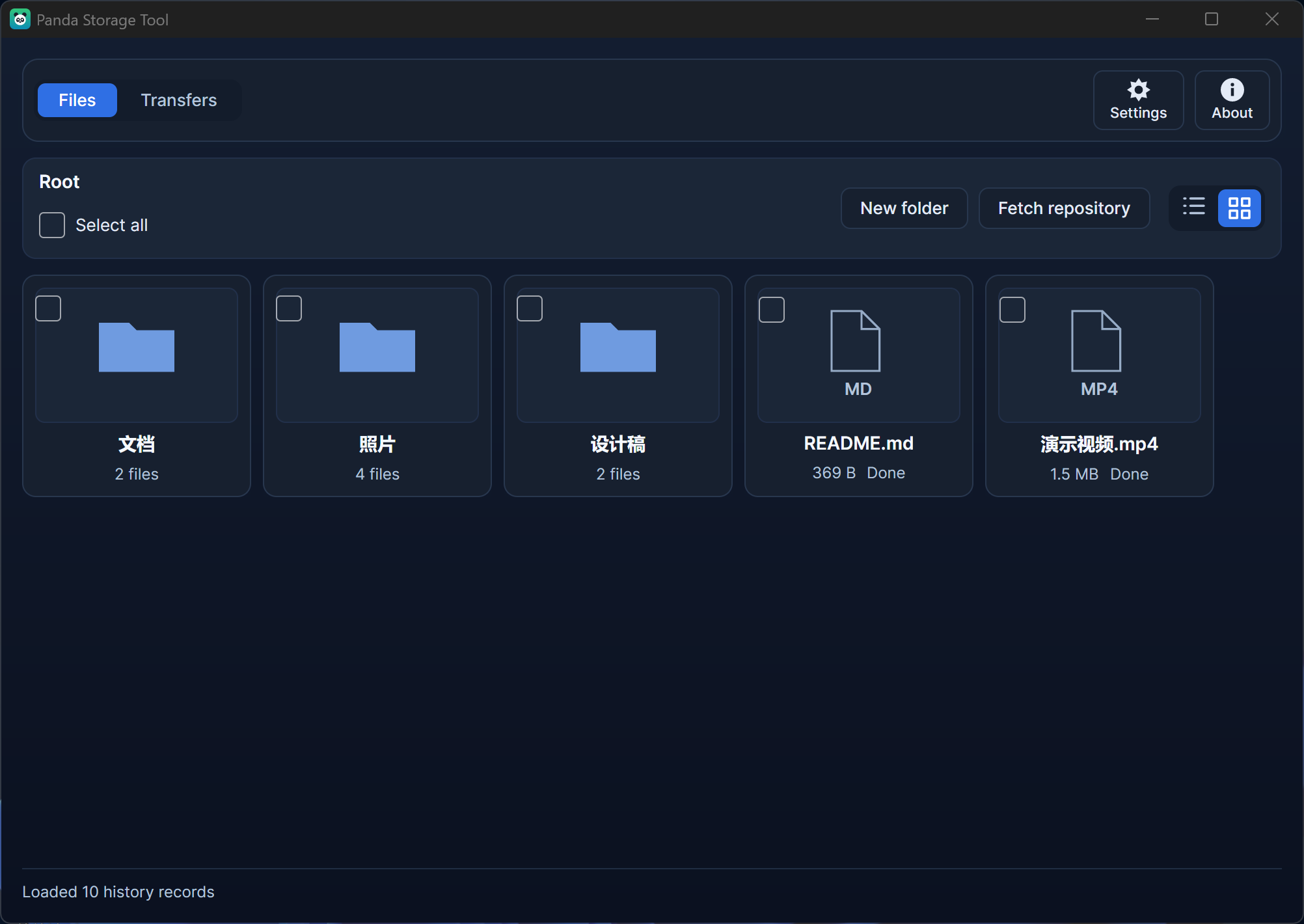
Any file type works: images, documents, archives, audio & video, code. The only visual difference is that images get thumbnails while everything else gets a type badge (extension + document outline). .gitkeep is the single special case: it is the placeholder that keeps empty folders alive in the repository, so it never shows up in the list.
Runs on Windows, macOS and Linux with a bilingual UI and light & dark themes. Release packages are self-contained single files — no .NET runtime needed: unzip and run.
Screenshots
Files (English): folders and files are first-class, and each folder shows how many files it holds
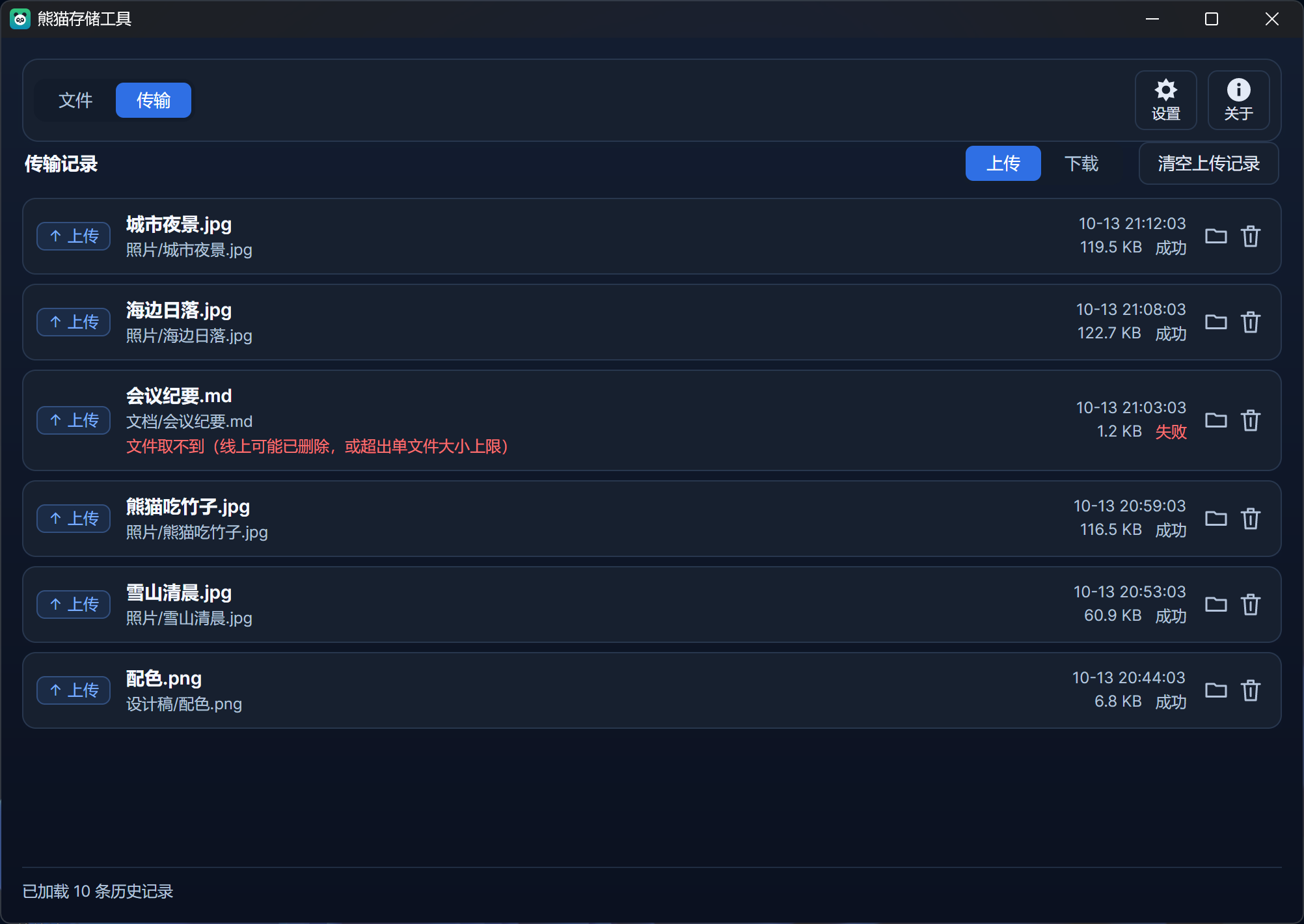
Transfer log: every upload and download is recorded, failures come with a reason
Features
- Drag & drop / paste upload: drop files or folders onto the list to upload them into the current folder;
Ctrl + Vuploads a bitmap from the clipboard (screenshots, images copied from a web page) or files copied in your file manager. - Upload a whole folder: the local folder tree is recreated under the current folder, every level gets a
.gitkeep, and sub-folders that contain no file at all are created too — so the structure stays intact in the repository. - Cloud-drive browsing: double-click to enter a folder, breadcrumbs to jump back; each folder shows the number of files it contains (nested ones included). The drive root is the "root directory" configured in settings (empty = the whole repository).
- Download: right-click a file for "Download to…", right-click a folder for "Download to folder…" (the folder itself and all nested folders are recreated), or tick several items and download them in one go.
- Shareable links: right-click → "Copy" gives you URL / Markdown / HTML (images as
, other files as[](...)); the link format israw.githubusercontent.com, jsDelivr or your own template. - Rename & delete: right-click or press
F2to rename (the file keeps its content, links and references follow); delete single files, whole folders, or a multi-selection with live progress. - Transfer log: every upload and download is recorded (direction, name and repository path, size, time, success or failure) with an upload-only / download-only filter, a "locate" button per row and a way to drop a single entry.
- View images large: click a thumbnail to open the preview window; zoom with
+ / -, fit to window orCtrl + wheel, close withEsc. - Theme & language: light / dark / follow system, and English / Simplified Chinese / Traditional Chinese / follow system — applied immediately and saved.
- Update check: "About" can query the latest release on demand, and the app also checks silently once a day. Only packages built for your platform count, so releases for other platforms never trigger a false update.
Download & run
| File | Platform |
|---|---|
PandaStorageTool-win-x64-<版本>.zip |
Windows 64-bit (Intel / AMD) |
PandaStorageTool-win-x86-<版本>.zip |
Windows 32-bit |
PandaStorageTool-win-arm64-<版本>.zip |
Windows on ARM |
PandaStorageTool-linux-x64-<版本>.tar.gz |
Linux 64-bit (Intel / AMD) |
PandaStorageTool-linux-arm64-<版本>.tar.gz |
Linux ARM64 |
PandaStorageTool-osx-x64-<版本>.tar.gz |
macOS (Intel) |
PandaStorageTool-osx-arm64-<版本>.tar.gz |
macOS (Apple silicon) |
- Every package is a self-contained single file — no .NET runtime required. On Windows unzip and run
PandaStorageTool.exe; on Linux / macOS runchmod +x PandaStorageToolfirst. - On Windows the first launch may trigger SmartScreen ("Windows protected your PC") because the binaries are not code-signed — that is expected: click "More info" → "Run anyway", or right-click
PandaStorageTool.exe→ Properties → tick "Unblock". - On macOS the first launch may be blocked by Gatekeeper: allow it under System Settings → Privacy & Security.
checksums.txtholds the SHA256 checksums of all packages (sha256sum -c checksums.txt).
Before you start
- Prepare a repository to store files in — a fresh empty one or an existing one. A public repository is recommended: only then are raw / jsDelivr links readable by anyone (a private repository accepts uploads but others cannot open the links).
- Create a Personal Access Token: GitHub → Settings → Developer settings → Personal access tokens with read & write access to repository contents (classic:
repoorpublic_repo; fine-grained:Contents: Read and write). - Open the app → "Settings" → "Storage": fill in the token, owner, repository and branch, hit "Test connection" and save. Saving runs the connection test again first: if it fails nothing is written.
The token is stored on your machine only (%LOCALAPPDATA%\PandaStorageTool\appdata.json) and is never sent anywhere except GitHub.
Known limitations
- The GitHub Contents API recommends files ≤ 100 MB; use Git LFS or the Git Data API for anything larger.
- Uploading a folder commits one file at a time (plus one placeholder commit per empty folder), so large folders are slow and can hit GitHub's API rate limit (5000 requests per hour).
- Non-image files only get a type badge, not a content preview — use "Open link" to view them.
- Empty folders are tracked locally: folders deleted elsewhere (web UI, command line) disappear only after a "Refresh" or "Fetch repository".
- "Factory reset" wipes local data only (settings, thumbnail cache, upload staging) — nothing in the repository is touched.
Released · Last updated