Mini-Kanban
A drag & drop task board: a Next.js + @dnd-kit frontend on a Go Gin + GORM + PostgreSQL backend, with a recycle bin and an audit log built in
Stack
- Next.js 14
- TypeScript
- Tailwind CSS
- @dnd-kit
- Go
- Gin
- GORM
- PostgreSQL
- Redis
- JWT
Login, user CRUD, department management, project CRUD, task CRUD, a four-column drag & drop board, file attachments, a recycle bin (soft delete) and an audit log (with snapshots of physically deleted data).
Screenshots
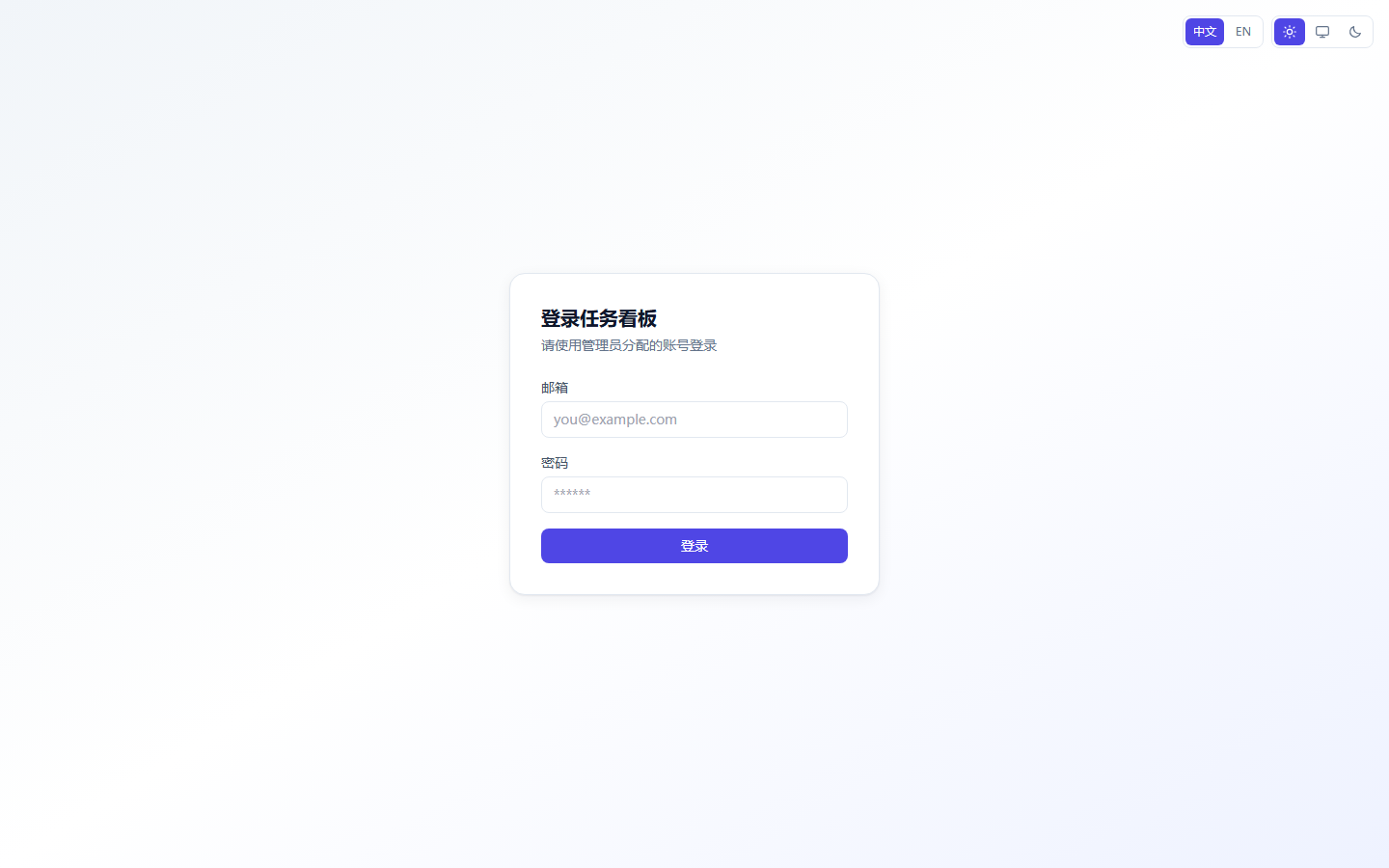
Login (Simplified Chinese / English, light / dark themes)
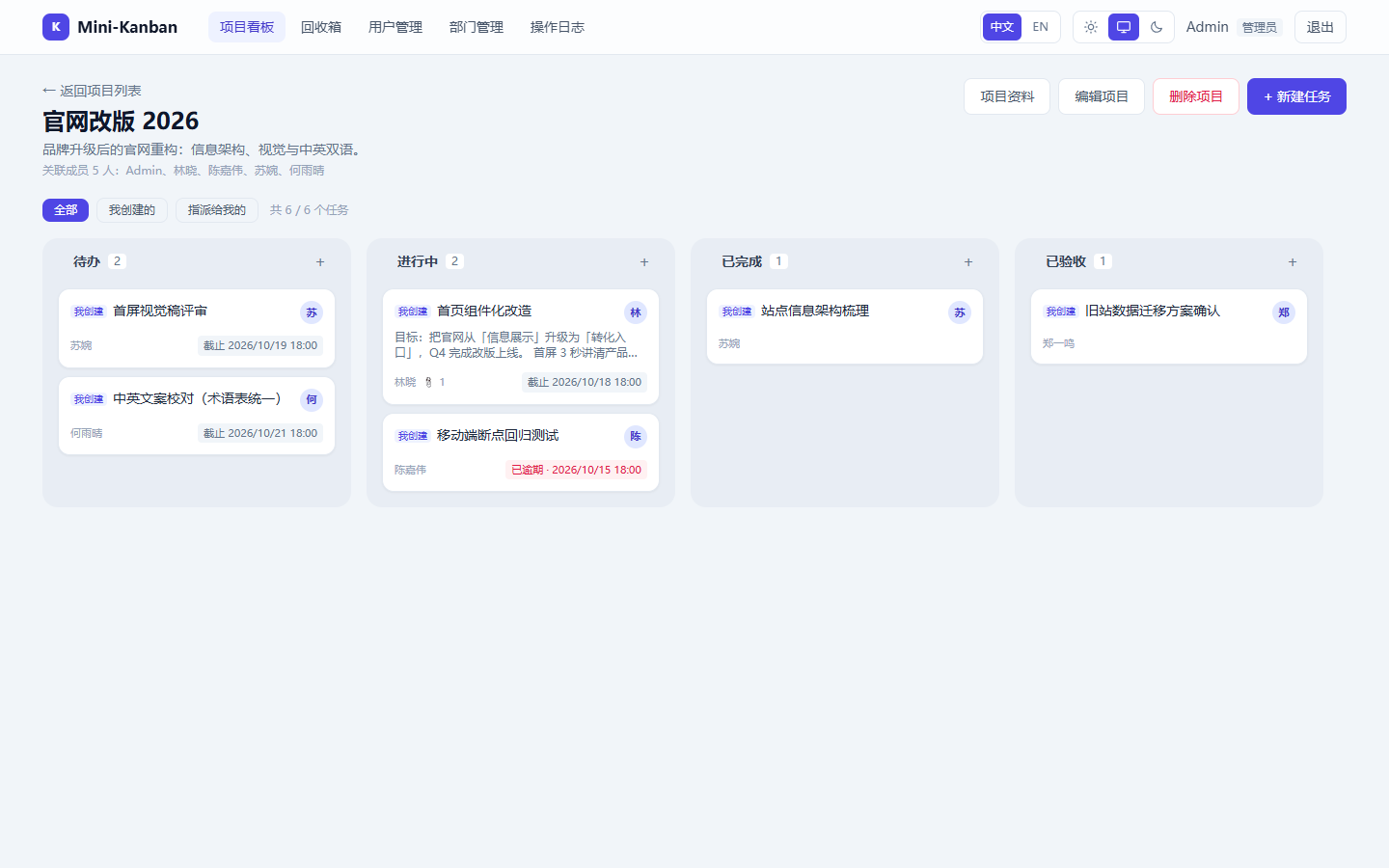
Four-column drag & drop board (Todo / In progress / Done / Accepted; cards show assignee, attachment count and due date; filter by "All / Created by me / Assigned to me")
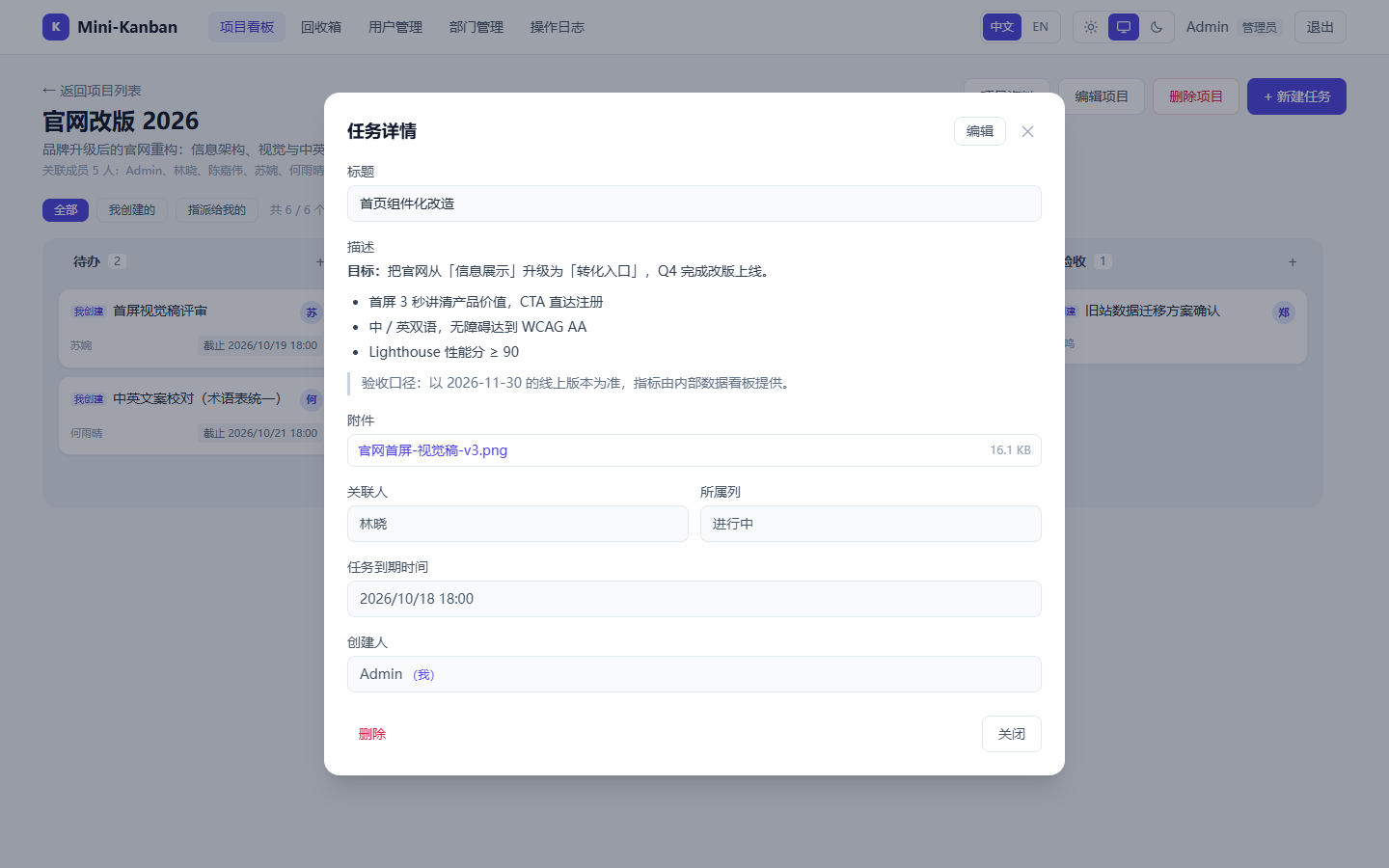
Task detail (rich-text description, attachments, assignee / column / due date)
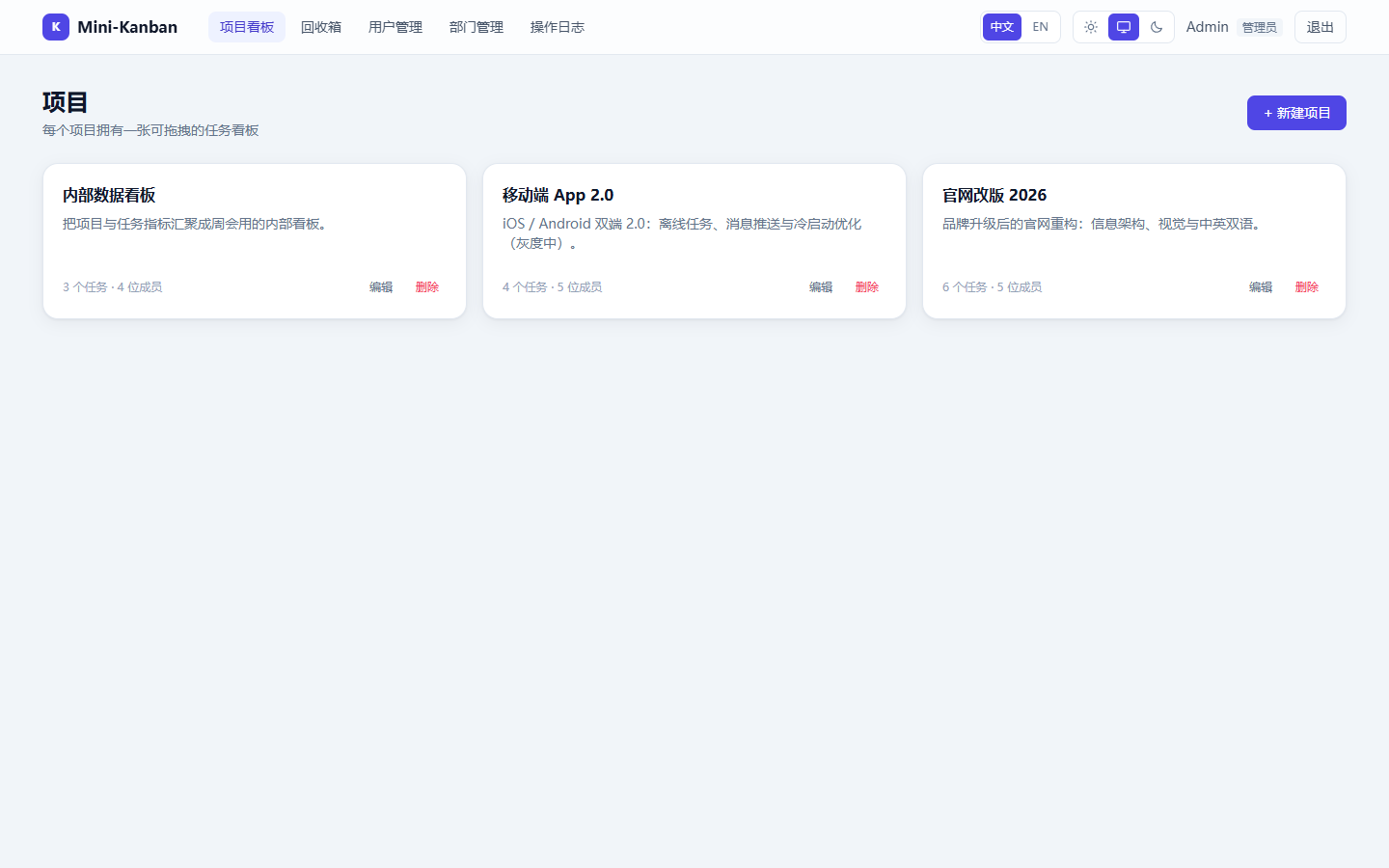
Project list & project docs (docs support rich text, inline images, attachments and title search)
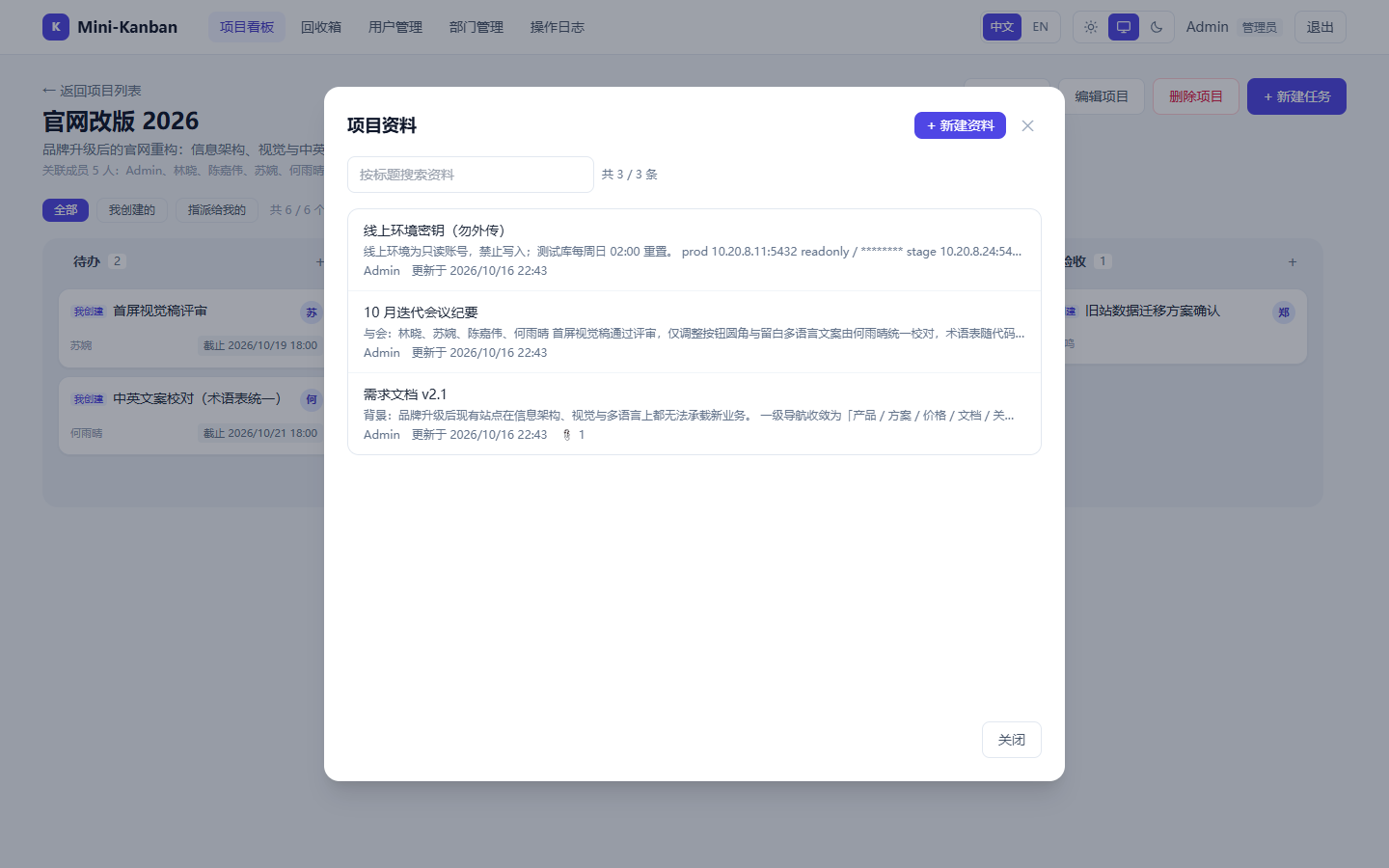
Recycle bin (restore / permanently delete soft-deleted data; project entries show batch task counts)
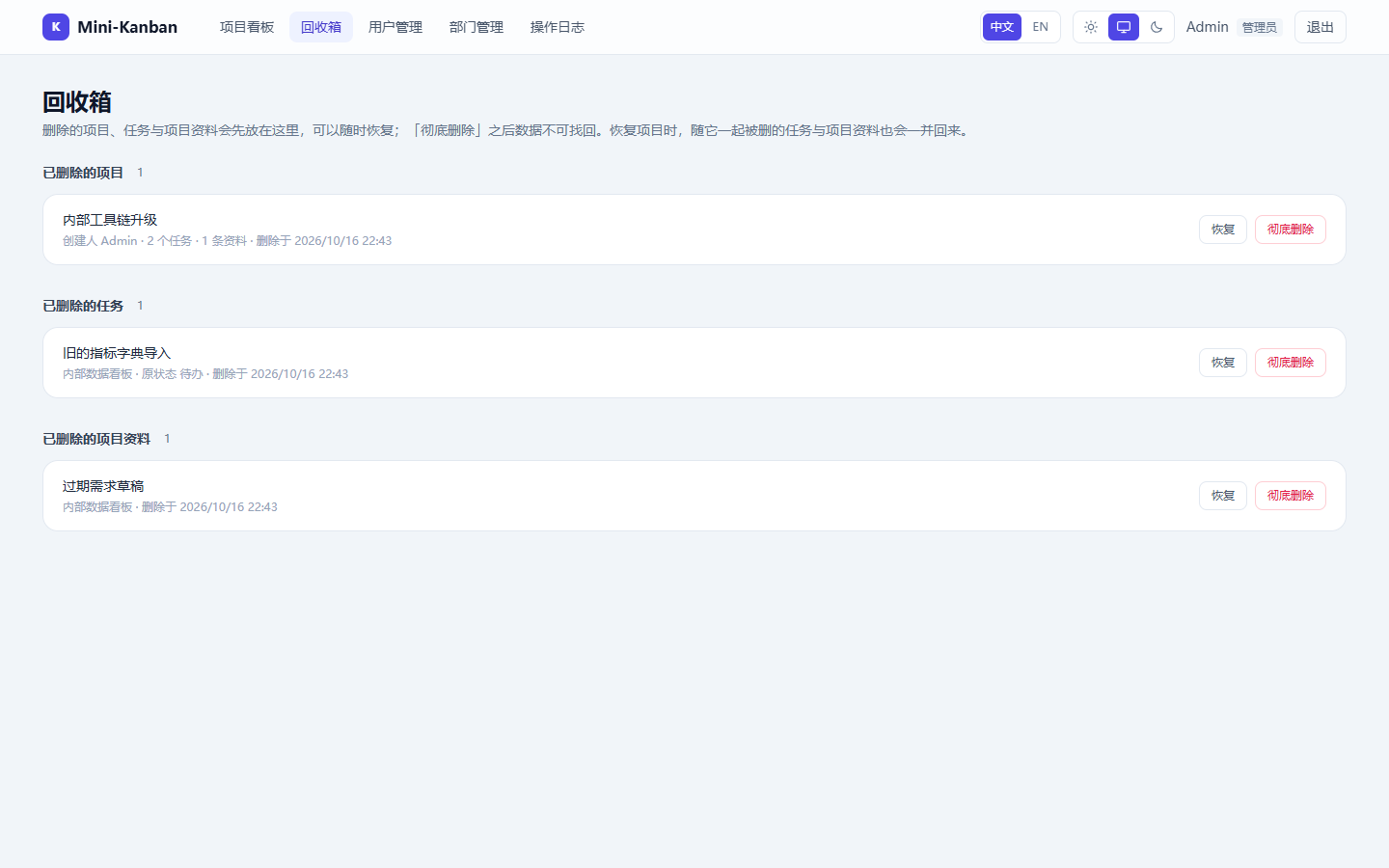
User management & audit log (admin only)
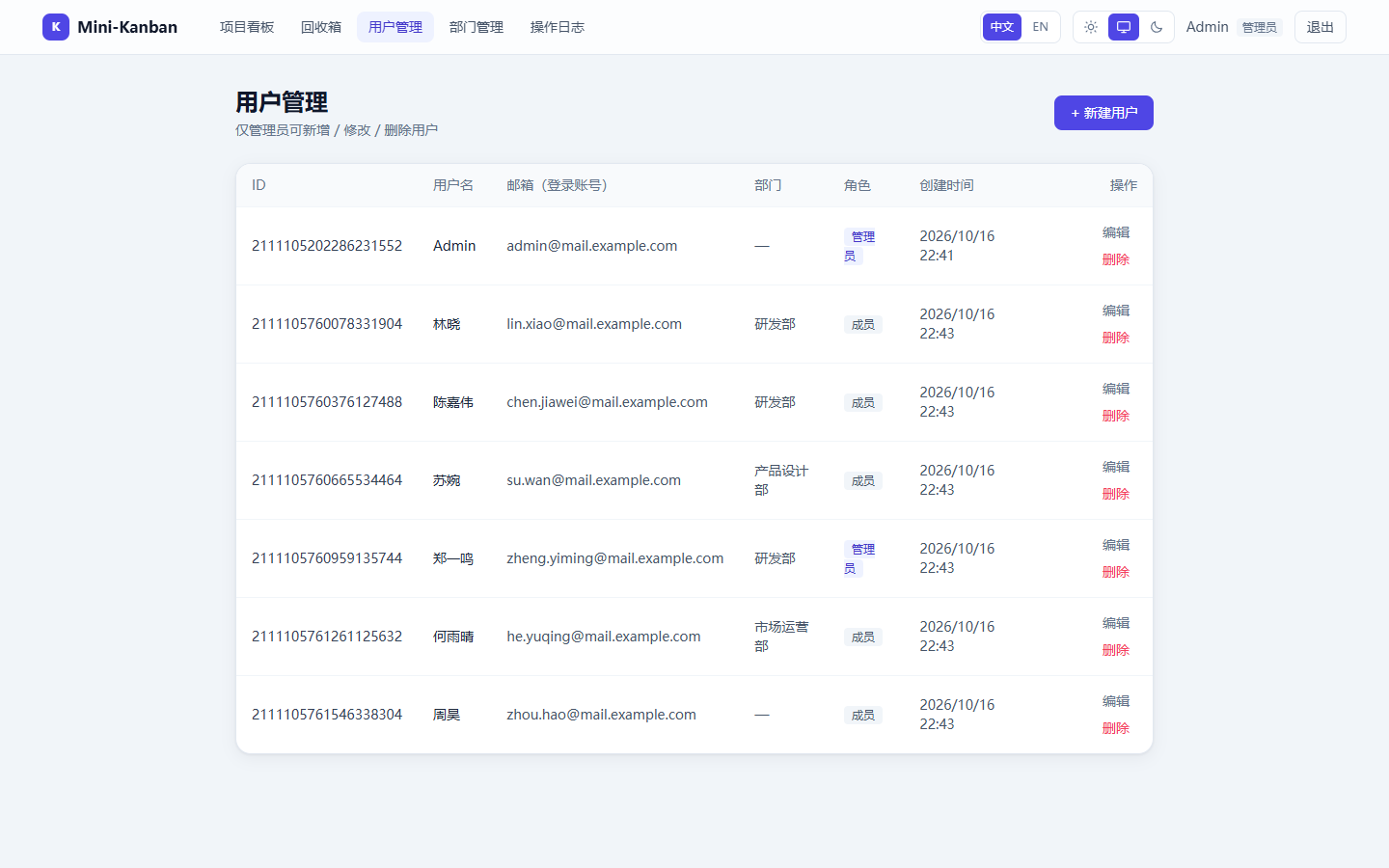
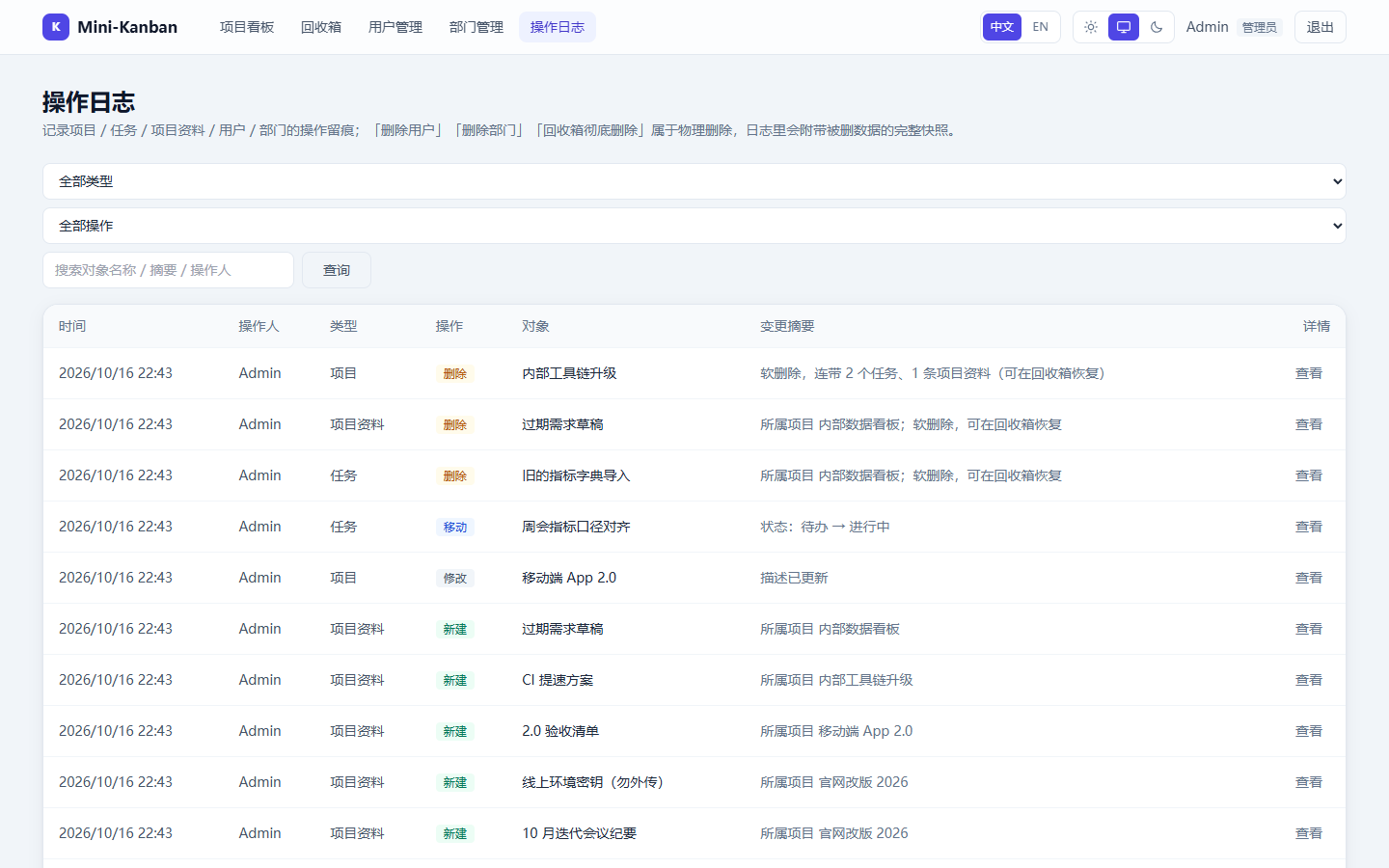
Dark theme
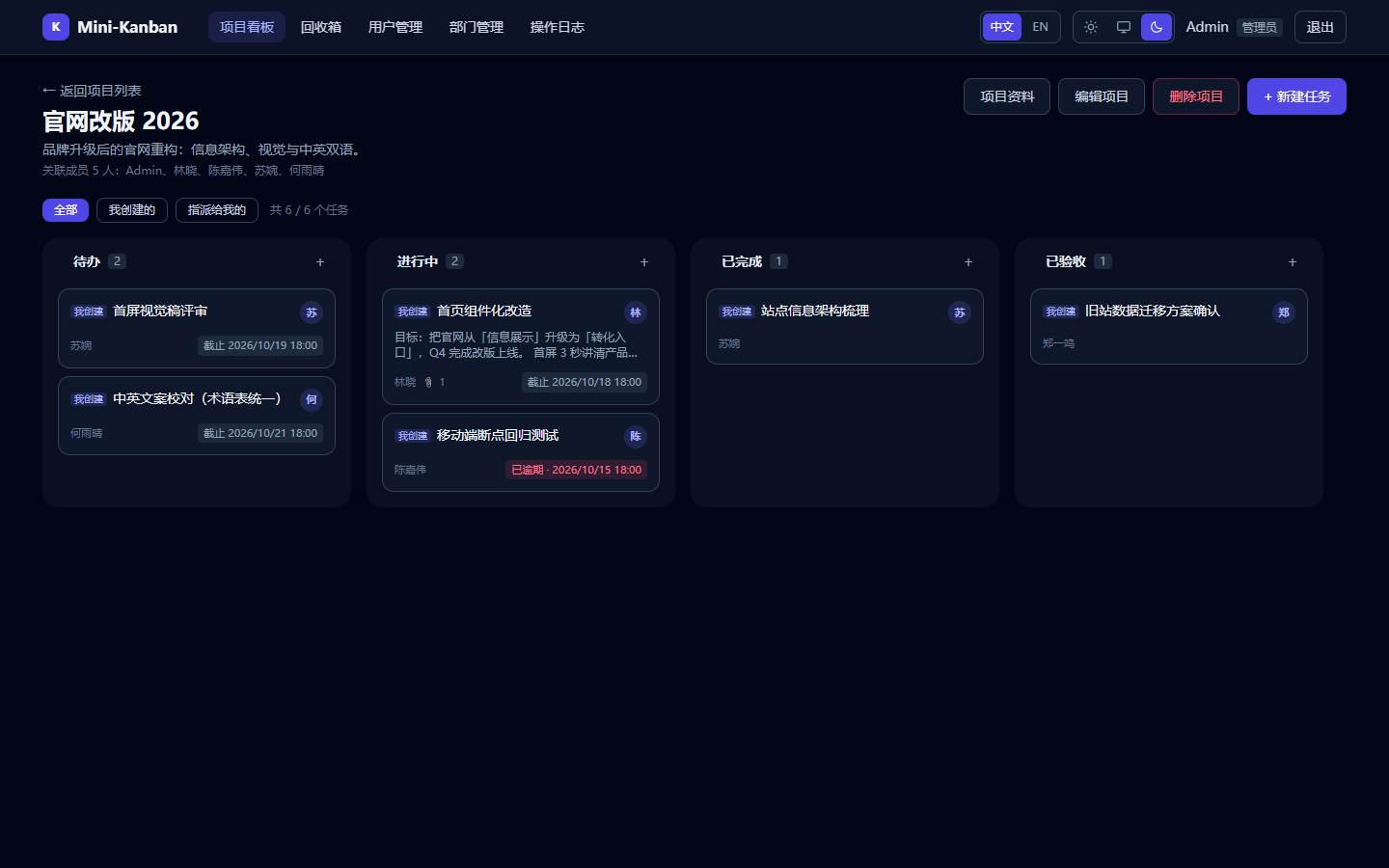
Table of contents
server/                                    Go Gin backend (module name: mini-kanban)
  main.go                                  Entry point: load config / run the setup wizard when unconfigured
  config.example.yaml                      Config template (tracked in git)
  config.yaml                              Local config (git-ignored)
  internal/config                          Config loading, validation, wizard rendering & write-back
  internal/setup                           First-run setup wizard (page + probing + write-back)
  internal/db                              GORM connection, table/column/index creation, initial admin
  internal/cache                           Redis wrapper (Get/Set/DeletePrefix)
  internal/i18n                            API message i18n: negotiation + English catalog (keyed by Chinese source text)
  internal/storage                         File persistence, extension allow-list, random file names
  internal/models                          User / Department / Project / Task /
                                           ProjectMember / TaskAttachment / OperationLog
  internal/middleware                      Auth(JWT), Admin, CORS, Redis GET cache
  internal/handlers                        auth / user / project / task / project_doc /
                                           department / trash / file / log
  internal/oplog                           Audit log writing + data snapshots on physical delete
  internal/router                          Central route & middleware registration
  internal/utils                           JWT, email & password validation, file name cleanup
  webstatic.go                             Serves the static site from the web-dist directory (NoRoute + SPA fallback)
  web-dist/                                Static export directory (build output, git-ignored)
  data/uploads/                            Attachment directory (storage.dir, git-ignored)

build.sh                                   Cross-compiles and packages the release archives (with the web-dist directory, version in the name)
build-web-static.sh                        Static-exports the frontend into server/web-dist (prerequisite of build.sh)
build-web-static.bat                       ↑ for Windows (GBK-encoded, safe to double-click)

tools/release/                             Start scripts inside the archives (start.sh / start.bat)
docs/screenshots/                          Screenshots used by the README
docs/release-notes/                        Per-version release notes (picked up automatically on tag push)

web/                                       Next.js frontend (App Router + TS + Tailwind)
  app/login                                Login
  app/                                     Home (redirects to /projects or /login based on auth state)
  app/projects                             Project list (create / edit / delete)
  app/projects/[id]                        Board (four columns + attachments + rich text)
  app/departments                          Department management (admin)
  app/users                                User management (admin)
  app/trash                                Recycle bin (restore / delete permanently)
  app/logs                                 Audit log (admin, with data snapshot viewer)
  components/Board.tsx                     @dnd-kit cross-column / same-column sorting
  components/                              AuthProvider / AuthGuard / NavBar / TaskCard /
                                           TaskModal / ProjectModal / ProjectDocsModal /
                                           MemberPicker / AttachmentList / RichTextEditor /
                                           Modal / ConfirmProvider / UserSelect /
                                           ThemeProvider / ThemeToggle /
                                           I18nProvider / LanguageToggle /
                                           DocumentTitle (tab title)
  lib/i18n/                                i18n: zh-CN.ts (source language + all keys) /
                                           en.ts / index.ts (negotiation, interpolation, persistence) /
                                           pageTitle.ts (route -> page name) /
                                           server.ts (server-side language + page metadata)
  lib/labels.ts                            Business enums -> text (column names / roles / log types & actions)
  lib/api.ts                               Request wrapper, token (localStorage), fileUrl
  lib/types.ts                             Types and board column definitions (COLUMNS)
  lib/html.ts · date.ts · validate.ts      Rich text handling / dates / form validation
Download & run (fastest path)
Release archives live in Releases. There is one kind of
artifact per release: a server binary plus a web-dist/ directory with the built pages, both served by the same
process on the same port. No Node.js, no extra static directory, no nginx, no CORS.
| Platform | Artifact |
|---|---|
| Windows x64 / ARM64 | mini-kanban-v1.0.0-windows-amd64.zip / mini-kanban-v1.0.0-windows-arm64.zip |
| Linux x64 / ARM64 | mini-kanban-v1.0.0-linux-amd64.tar.gz / mini-kanban-v1.0.0-linux-arm64.tar.gz |
| macOS Intel / Apple Silicon | mini-kanban-v1.0.0-darwin-amd64.tar.gz / mini-kanban-v1.0.0-darwin-arm64.tar.gz |
The version is part of every file name (e.g.
v1.0.0); the top-level directory matches the archive name and each archive also ships aversion.txt. The launcher prints the version on startup, so it is always obvious which build you are running.checksums.txtholds the SHA256 of all archives (sha256sum -c checksums.txtto verify).
Three steps:
- Unpack the archive for your platform completely —
web-dist/has to sit next to the binary. - Run
start.sh(start.baton Windows). - Open http://localhost:8281. With no
config.yamlin the directory the app enters the setup wizard (http://localhost:8281/setup): fill in the database / Redis connection, save — a dialog then waits for the service to come up and opens the status page after 3.5 s.
The only prerequisite is PostgreSQL: the database must exist beforehand (the service creates tables, not databases).
Redis is optional — leave redis.host empty to run without cache.
To build the archives yourself (e.g. after changing the frontend) see "Deployment" below.
Requirements
- Go 1.21+
- Node.js 18.17+ (required by Next.js 14)
- PostgreSQL (the database must be created beforehand — the service only creates tables, not databases)
- Redis (optional: leave
redis.hostempty to disable caching; the service keeps running)
Quick start
Command convention: blocks tagged
bashrun directly on macOS / Linux; they also work in PowerShell on Windows (cd,go run .,npm run devare universal). Steps that differ per platform (copying files, cross-compiling) are given in two variants.
Option 1: Setup wizard (recommended for a first deployment)
Without a config.yaml, the backend first starts a temporary service used only to fill in the configuration:
cd server
go run .
Open http://localhost:8281/setup in your browser (the port can be set with SETUP_PORT; when started on a server,
the log prints a remotely reachable IP).
The wizard provides: database / Redis connection tests, validation and write-back (rendered from the
config.example.yaml template, preserving comments and layout). If the database cannot be reached, saving is
blocked unless you tick "ignore"; an unreachable Redis only warns and the app degrades to a no-cache mode.
Once saved, the wizard closes itself and the service starts with the real configuration.
To reconfigure: start with SETUP_FORCE=1 — the existing config is backed up as config.yaml.bak.
Visiting /setup after configuration shows a "service is running" feedback page.
Note: the wizard form only covers the
server/database/redis/jwt/seedsections;storageanddatabase.logLevelare deliberately excluded from the form and filled from the template on write-back — editconfig.yamldirectly to change them.
Option 2: Copy the templates manually
# macOS / Linux
cd server
cp config.example.yaml config.yaml

cd ../web
cp .env.example .env.local
# Windows PowerShell
cd server
Copy-Item config.example.yaml config.yaml

cd ../web
Copy-Item .env.example .env.local
Configuration files
| File | Purpose |
|---|---|
server/config.yaml |
Backend config (git-ignored): port/mode, PostgreSQL, Redis & cache TTLs, JWT, initial admin, attachment storage, log level |
server/config.example.yaml |
Config template; also the base used by the setup wizard (which preserves its comments and layout) |
web/.env.local |
Frontend local config (git-ignored): NEXT_PUBLIC_API_BASE (backend API address) |
web/.env.example |
Frontend env template — copy it to .env.local on first use |
Full server/config.yaml reference:
server:
  port: "8281"          # Required. HTTP listen port (string)
  mode: "release"       # Required. debug | release | test; any other value fails at startup

database:
  # When dsn is non-empty it takes precedence (host/port/user/dbname/sslmode are then not validated)
  dsn: ""               # e.g. postgres://postgres:123456@localhost:5432/mini-kanban?sslmode=disable
  host: "localhost"     # Required when dsn is empty
  port: 5432            # Required when dsn is empty
  user: "postgres"      # Required when dsn is empty
  password: "123456"    # Required when dsn is empty; special characters need no manual escaping (auto URL-encoded)
  dbname: "mini-kanban" # Required when dsn is empty; the DB must exist — the service only creates tables
  sslmode: "disable"    # Required when dsn is empty
  preferSimpleProtocol: false  # Set to true on pgx protocol compatibility issues (disables extended query protocol)
  logLevel: "warn"             # silent | error | warn | info; any other value fails at startup; not shown in the wizard

redis:
  # Optional component: an empty host disables caching (remaining fields are then not validated and the service still runs)
  host: "localhost"
  port: 6379            # Required when host is non-empty
  password: ""          # Leave empty when there is no password
  db: 0
  cacheTTL: "30s"       # Required and must be > 0 when host is non-empty: project / task list cache TTL
  userCacheTTL: "1m"    # Required and must be > 0 when host is non-empty: user / department list cache TTL

jwt:
  secret: "replace-with-a-long-random-string"  # Required; changing it invalidates all issued tokens
  ttlHours: 24                     # Required and must be > 0; token lifetime in hours

seed:
  # Writes the initial admin only when the user table is empty; the section is cleared automatically afterwards
  # (so the plaintext password does not stay on disk)
  enabled: false        # When true, the three fields below are required
  adminEmail: ""        # Initial admin login email
  adminUsername: ""     # Initial admin display name
  adminPassword: ""     # Initial admin password; 8+ characters recommended

storage:
  # Directory for attachments and inline rich-text images; not shown in the wizard — maintain it in this file
  dir: "data/uploads"   # Required; relative paths resolve against the backend working directory, created automatically (must be writable)
  maxSizeMB: 10         # Required and must be > 0; at most 10 files per request, body limit = maxSizeMB x 10
Loading rules:
- Lookup order:
CONFIG_FILEenv var ->config.yaml->config.yml->configs/config.yaml->server/config.yaml->../config.yaml->../server/config.yaml(so starting from the repo root or fromserver/both work) - Environment variables take precedence:
PORT,DB_DSN,REDIS_ADDR(host:port),REDIS_PASSWORD,JWT_SECRET - No in-code fallbacks: a missing or invalid required field fails fast at startup instead of silently using a
default; an empty
redis.hostis the legitimate way to say "caching is off" - Other env vars:
SETUP_FORCE(force the setup wizard, backs up the current config as.bak),SETUP_PORT(port used by the wizard itself, default 8281),SNOWFLAKE_NODE_ID(snowflake node id, 0~1023; must differ across instances in a multi-instance deployment or generated IDs will collide — keep the default 0 for a single instance)
See server/config.example.yaml for a detailed field-by-field description (ranges and caveats).
Frontend web/.env.local:
NEXT_PUBLIC_API_BASE=http://localhost:8281/api # Port must match server.port
NEXT_PUBLIC_*values are inlined at build time: changing the address requires re-runningnpm run build; setting the variable at runtime has no effect (see the "Deployment" section).
Running
Backend:
cd server
go run .              # or build first: go build -o mini-kanban .
Startup logs print the port, database, Redis and cache status; GET /healthz returns service and Redis status.
Frontend:
cd web
npm install
npm run dev           # http://localhost:3201
If the backend is not on local port 8281, edit web/.env.local:
NEXT_PUBLIC_API_BASE=http://localhost:8281/api
Initial admin account
No account is created by default (seed.enabled: false). To seed one, enable it and fill in the three fields:
seed:
  enabled: true
  adminEmail: "[email protected]"
  adminUsername: "Admin"
  adminPassword: "at least 8 characters"
Rules:
- Created only when the user table is empty; if users already exist it is skipped, and the startup log prints the created email
- After a successful create the
seedsection is cleared automatically (enabled=false, and email / username / password emptied) so the initial password does not linger on disk in plaintext; fill it in again to re-seed - Other member accounts are created by an admin on the "Users" page
Attachment storage
Task attachments, project doc attachments and inline rich-text images all live under storage.dir:
-
At most 10 files per request; the whole request body limit is
storage.maxSizeMB x 10 -
Extension allow-list: images (png / jpg / jpeg / gif / webp / bmp / ico), documents (pdf / txt / md / csv / doc / docx / xls / xlsx / ppt / pptx), archives (zip / 7z / rar / gz), audio & video (mp4 / mp3 / wav).
.svgis not allowed (it can carry scripts) -
Stored file names are generated server-side: 32 random hex characters + an allow-listed extension. User-supplied names never enter the path (prevents directory traversal)
-
Public URL is
/api/files/<32-hex-name>; the frontend completes it viafileUrl()against the API base -
The download route requires authentication, but the URL carries not the login token — it carries a dedicated "download ticket": after login the frontend calls
POST /api/files/ticketto obtain one (aud=file, 2 hours by default) and builds/api/files/<random-name>?ticket=... -
The reason for this split:
<img src>in rich text and attachment links are requested directly by the browser and cannot carry anAuthorizationheader, so the credential has to live in the URL. A ticket can only read attachments — it cannot call other APIs — so a forwarded or logged download URL does not leak the session. The login token never appears in any URL -
The ticket JTI equals the login session JTI: after logout the login token goes into the Redis blacklist and the ticket becomes invalid immediately
-
Download also checks data permissions (a ticket says who is downloading, not whether they may see this file): the server looks up ownership by the file's references and applies the visibility rules of the corresponding entry point. The principle is "if you can see it, you can download it" —
- Doc attachments and inline images inside doc content: follow the visibility of the project the doc belongs to (if you can see the project, you can see its docs);
- Task attachments and inline images in a task description: follow task visibility (admin / task creator / assignee / project creator) — only people who can see the task on the board can download its attachments.
If the referencing data has been deleted (doc / task soft-deleted), the response is always 404. A temporary file not yet referenced by any data (an image just pasted into the editor, an attachment uploaded but not yet saved) may be downloaded only by its uploader — the upload is recorded in
uploaded_files. Passing authentication but lacking data permission also returns 404, so existence is not leaked -
Tickets are signed with a separate key: derived from
jwt.secretvia one-way HMAC-SHA256 (labelmini-kanban/file-ticket/v1), so no extra config entry is needed. A login token therefore cannot pass the download check and a ticket cannot pass the login check, even if one side forgets to verifyaud;aud=fileplus the explicit rejection inAuthRequiredact as defense in depth -
Both credential types are pinned to
HS256and must carryexp(prevents algorithm confusion and never-expiring tickets) -
The frontend
AuthProviderobtains the ticket and silently renews it before expiry (fileUrl()/resolveFileUrls()append the current ticket automatically;TaskModalrefreshes image URLs in the description after renewal); before saving,toStoredHtml()strips the ticket so only the plain/api/files/<random-name>is stored -
Responses carry
X-Content-Type-Options: nosniff; failures getCache-Control: no-storewhile normal responses getprivate, max-age=3600(so proxies / CDNs cannot cache around the auth check). Images and video are displayed inline; other types are forced to download and the original file name is restored when possible
API
| Method | Path | Description |
|---|---|---|
| POST | /api/auth/login | Login, returns a JWT |
| GET | /api/auth/me | Current user |
| POST | /api/auth/logout | Logout (token added to the Redis blacklist) |
| PUT | /api/auth/profile | Update own profile (username / email / password, not role); no frontend entry yet |
| GET | /api/files/:name | Attachment download (login + data permission required: ?ticket=, see "Attachment storage") |
| POST | /api/files/ticket | Obtain an attachment download ticket (authenticated, 2 hours by default) |
| GET | /api/departments | Department list |
| GET | /api/departments/:id | Department detail |
| POST | /api/departments | Create department (admin) |
| PUT | /api/departments/:id | Update department (admin) |
| DELETE | /api/departments/:id | Delete department (admin; rejected when it still has members) |
| GET | /api/users | User list |
| GET | /api/users/:id | User detail |
| POST | /api/users | Create user (admin) |
| PUT | /api/users/:id | Update user (admin) |
| DELETE | /api/users/:id | Delete user (admin, with data snapshot) |
| GET | /api/projects | Project list |
| POST | /api/projects | Create project |
| GET | /api/projects/:id | Project detail |
| PUT | /api/projects/:id | Update project |
| DELETE | /api/projects/:id | Soft-delete project |
| GET | /api/projects/:id/tasks | Task list |
| POST | /api/projects/:id/tasks | Create task |
| GET | /api/projects/:id/docs | Project doc list (requirements / meeting notes / designs / project secrets / test accounts, etc.) |
| POST | /api/projects/:id/docs | Create project doc (project members) |
| PUT | /api/docs/:id | Update project doc (doc creator among project members / project creator / admin) |
| DELETE | /api/docs/:id | Delete project doc (soft delete, same permission; restorable from the recycle bin) |
| POST | /api/uploads | Attachment upload (multipart/form-data, field name files, up to 10) |
| GET | /api/tasks/:id | Task detail |
| PUT / PATCH | /api/tasks/:id | Update task |
| DELETE | /api/tasks/:id | Soft-delete task |
| PATCH | /api/tasks/:id/move | Board drop ({status, index}), server re-orders position |
| GET | /api/trash | Recycle bin: deleted projects + tasks + project docs (with batch counts / owning project title) |
| POST | /api/trash/projects/:id/restore | Restore project (together with tasks, docs and attachments deleted in the same batch) |
| DELETE | /api/trash/projects/:id | Permanently delete project (physically removes the project and its tasks, docs, attachments, member links) |
| POST | /api/trash/tasks/:id/restore | Restore task (together with attachments deleted in the same batch) |
| DELETE | /api/trash/tasks/:id | Permanently delete task (physically removes the task and its attachments) |
| POST | /api/trash/docs/:id/restore | Restore project doc (together with attachments deleted in the same batch) |
| DELETE | /api/trash/docs/:id | Permanently delete project doc (physically removes the doc and its attachments) |
| GET | /api/logs | Audit log pagination (admin): targetType / action / operatorId / keyword / page / pageSize (default 20, max 100) |
| GET | /api/logs/:id | Audit log detail (admin); physically deleted entries include a snapshot |
| GET | /healthz | Health check (includes Redis status) |
| GET | /setup | Feedback page shown once configuration is complete |
Recycle bin (soft delete)
Deleting a project / task / project doc only writes deleted_at; data stays in the database and default queries
filter it out automatically (GORM soft delete). Records deleted in the same batch share the same deleted_at
timestamp, and restore matches that timestamp exactly:
- Restoring a project brings back the tasks, project docs and attachments deleted together with it. Tasks / docs deleted separately before the project was deleted are not resurrected — they remain in the task / doc sections of the recycle bin and can be restored individually.
- Tasks and docs deleted along with a project are only represented inside the project entry
(
taskCount/docCountare exactly the numbers that will come back), not duplicated in the task / doc sections. - Docs support individual restore / permanent delete just like tasks; docs deleted with a project share its batch and are restored together with it.
- "Delete permanently" is a physical delete (
Unscoped): a project also loses all its tasks, project docs, attachments and member links — unrecoverable — so the audit log keeps a snapshot of the whole data tree (see below). - Visibility and disposal permission are symmetric: admins see everything; other users only see data they are allowed to dispose of (projects by creator; tasks by creator / assignee / project creator; docs by doc creator / project creator, and only while still a project member).
Audit log
Covers project / task / project doc / user / department operations, stored in operation_logs, and searchable by
type / action / keyword on the "Activity logs" page (admin only).
- Recorded fields: operator (id + username snapshot at the time), target type & name, action, change summary, time.
Summaries are generated server-side from field-level diffs, e.g.
Status: Todo -> In progress; Assignee: Zhang -> Li; rich-text bodies only produce "description updated" — the body itself is not written to the log. - Actions:
create,update,move(board drag that changes status, tasks only),delete,restore(recycle bin),purge(permanent delete from recycle bin). - Physical deletes keep a data snapshot: deleting a user, deleting a department, and purging a project / task /
project doc serialize the deleted data into
snapshot(a JSON text column), because after deletion there is nothing else to trace:- User snapshot: account info (no password) + department name + counts of assigned / created tasks, owned projects, project member links;
- Department snapshot: department info + remaining member count at deletion time (deletion is blocked when members exist, so this is normally 0);
- Project snapshot: project + members + all its tasks and project docs with their attachments (purging a project removes all of these);
- Task snapshot: task + all attachments + owning project title;
- Doc snapshot: project doc + all attachments + owning project title.
Soft-deleted data (a
deleteaction on a project / task / project doc) is still in the database, so only the action is recorded — no snapshot.
- Write timing: normal operations are recorded asynchronously after the business call succeeds (a failure only logs server-side and does not affect the API result); a physical delete and its snapshot are written in the same transaction, so you never end up with "data deleted, snapshot missing".
- The log stores only the operator id and a username snapshot with no foreign key, so deleting a user does not cascade to their historical log entries.
- The list endpoint does not return
snapshot(a single one can be large — purging a project carries all its tasks); click "View" to fetch one entry. Log endpoints have no cache middleware so auditing stays real-time.
Database migration
Runs automatically at startup — no manual steps:
- Tables and missing columns: tables are created in the order
Department -> User -> Project -> Task -> ProjectMember -> TaskAttachment -> ProjectDoc -> ProjectDocAttachment -> UploadedFile -> OperationLog; existing tables get missing columns added (works around AutoMigrate errors on PostgreSQL 18 + pgx) - Indexes: soft-delete (
deleted_at) indexes for projects / tasks / attachments / project docs and doc attachments are created as needed - Data backfill: legacy tasks missing
creator_idfall back to the owning project's creator (idempotent, only fills nulls) - When
project_membersfirst appears, existing projects are initialized as "visible to everyone" so historical projects do not suddenly become invisible
Frontend pages and permissions
| Route | Page | Visible to |
|---|---|---|
| /login | Login | Public |
| / | Home (redirects by auth state) | — |
| /projects | Project list | Logged-in users |
| /projects/[id] | Four-column board (Todo / In progress / Done / Accepted) + a "Project docs" entry at the top (requirements / meeting notes / designs / project secrets / test accounts, with rich text, attachments and title search); tasks can be filtered by "All / Created by me / Assigned to me" | Logged-in users |
| /trash | Recycle bin (projects / tasks / project docs, restore or delete permanently) | Logged-in users (filtered by permission) |
| /users | User management | Admins |
| /departments | Department management | Admins |
| /logs | Activity logs | Admins |
The frontend supports light / dark theme switching; the token lives in localStorage (key mini-kanban_token) and is
cleared automatically on 401, redirecting back to the login page.
Internationalization
The UI supports Simplified Chinese and English (Chinese is the default); the switch sits in the top-right corner of the navbar (also on the login page). The URL does not change with the language, so a refreshed or shared link shows each visitor the language in their own cookie.
How the language is stored and applied
- Cookie
mini-kanban-lang(valuezh-CN/en, one year,SameSite=Lax, plusSecureunder HTTPS) is the single source of truth: the root layout reads it on the server to set<html lang>and the page title, and body copy is rendered in that language on the first paint — no "flash of Chinese before switching to English". A mirror copy inlocalStorageacts as a fallback when the cookie is cleared. - Switching updates the cookie / localStorage /
<html lang>/ request header together, with no page reload. - The browser tab title is always
page name - {app.title}(e.g.Sign in - Mini-Kanban). Page names are declared as keys in each route segment'slayout.tsxviapageMetadata()(a page is a"use client"component and cannot exportmetadata); on client-side navigation and language switchesDocumentTitlerefreshes the title from the same route map inlib/i18n/pageTitle.ts. - The trade-off: routes become rendered per request instead of statically prerendered (because
cookies()is used). The frontend already depends on auth state for data fetching, so the impact is negligible. - This does not hold in static-export mode (
output: "export"has no request context): the first paint is always the default language, an inline script in<head>fixes<html lang>first, andI18nProviderswitches the copy from the cookie / localStorage after mount — so non-default languages flash briefly. The release archives use the static export (the pages ship as a directory inside the archive); if the first paint matters more, deploy the Docker Compose stack, whose server-rendered build does not have this caveat.
Frontend copy
| File | Purpose |
|---|---|
web/lib/i18n/zh-CN.ts |
Source language, and the definition of every copy key (flat dotted domain.purpose; {name} is an interpolation placeholder) |
web/lib/i18n/en.ts |
English; typed as Record<MessageKey, string> — if a key added or renamed in Chinese is missing here, npm run build fails immediately |
web/lib/i18n/index.ts |
Language constants, dictionary lookup & interpolation, cookie / localStorage access, tNow() |
web/lib/i18n/pageTitle.ts |
Route -> page-name key map plus the page name - {app.title} composition (shared by server and client) |
web/lib/i18n/server.ts |
Server-side language cookie read (currentLang()) and pageMetadata() for route-segment layouts |
web/components/DocumentTitle.tsx |
Refreshes the tab title for the current language (static-export builds can only bake in the default language) |
web/components/I18nProvider.tsx |
Global language provider: useI18n() returns { lang, locale, setLang, t } |
web/lib/labels.ts |
Business enum -> copy (board column names, roles, audit log target types / actions); unknown values are echoed as-is |
Usage conventions:
- When rendering use
const { t } = useI18n()and pass params viat("key", { name }); - Outside render (fallback text in
lib/api.ts, failure toasts inside async callbacks) usetNow(...)— it is a module-level current language that does not participate in rendering, so switching languages does not trigger unnecessary refetches; - Dates always go through
formatDateTime(iso, locale)fromlib/date.tswithlocalefromuseI18n().locale, producing2026/09/20 14:30in Chinese and09/20/2026, 14:30in English; - English copy involving counts is deliberately written as
Tasks: {count}to avoid pluralization, so no ICU plural rules are needed.
To add a language: add a dictionary -> register it in LANGS / DICTS / LANG_LABELS / LANG_LOCALES in
lib/i18n/index.ts -> the switcher gains an extra option automatically.
Backend API messages
Backend error / message fields are also localized; negotiation order (internal/i18n):
Accept-Languageheader — every request fromlib/api.tscarries the current UI language;mini-kanban-langcookie — attachment downloads (/api/files/xxx?ticket=) are issued directly by the browser and cannot carry custom headers, so this is the fallback;- Neither -> Chinese.
The English catalog lives in server/internal/i18n/messages.go and is keyed by the Chinese source text, so
exits such as fail / badRequest / okMessage just look it up internally and callers need no changes. Messages
with dynamic content (Save failed: <detail>, Upload at most 10 files at a time, Attachment "a.png" not found)
are assembled with three rules: prefix + suffix + 「」. Unlisted source text (for example an English error returned
by the database) is passed through unchanged.
Guardrail: go test ./internal/i18n/ scans for hard-coded Chinese text in internal/handlers and verifies that each
one has a translation in the English catalog — forgetting to translate new or modified copy fails the test.
Known boundaries (intentional):
- Audit log
summary/ change items and data snapshots are text written at log time and stay Chinese: otherwise the same entry would change with the viewer's language and lose stable audit semantics. All other copy on the log page (headers, filters, pagination) is English. - The setup wizard
/setupis a one-off ops page and stays Chinese. - Assertions like
useXxx must be used within XxxProvideronly appear in the console and are not translated.
What Redis is used for
- Cache middleware:
middleware.Cache(ttl, namespace)caches GET responses (keyed by user + path + query string) and returnsX-Cache: HITon a hit; every write invalidates viacache.DeletePrefix("httpcache:<namespace>:"). - Logout blacklist:
auth:blacklist:<jti>is kept until the token expires naturally, and the auth middleware rejects logged-out tokens. - When Redis is unavailable the app degrades to a no-cache mode and keeps running
(
GET /healthzreports theredisstatus).
Self-checks and tests
After changing the backend or frontend, run these before deploying:
# Backend: static analysis + unit tests
cd server
go vet ./...
go test ./...
The internal/i18n test is a copy guardrail: it scans for hard-coded Chinese text in internal/handlers and
verifies that the English catalog (internal/i18n/messages.go) has a translation for each — a missing translation
for new API copy fails here.
# Frontend: type check (emits no files)
cd web
npx tsc --noEmit
Frontend i18n completeness is also enforced by the type system: lib/i18n/zh-CN.ts exports the MessageKey union
and en.ts is declared as Record<MessageKey, string>, so a missing English key or a wrong copy key in a
component fails at tsc --noEmit (and at npm run build). Likewise, mistakes in the request parameters or return
types in lib/api.ts are caught by this step.
Quick smoke test once the service is up:
curl http://localhost:8281/healthz # {"redis":true,"status":"ok"}
Deployment
The only released artifact is the ready-to-run archive: the server binary plus a web-dist/ directory, both
served by the same process on the same port. No Node.js, no extra static directory, no nginx, no CORS on the target
machine.
Why the frontend is not
go:embed-ed into the binary: that would add roughly 1 MB to every platform's executable, write those bytes into each of the six cross-compiled artifacts, and force a full Go rebuild whenever the frontend changes. Shipping it as a directory keeps the binary down to business code and lets gateways / CDNs serve the pages straight from disk. The price is thatweb-dist/must sit next to the binary (WEB_DIST_DIRpoints elsewhere); without it the service still starts but serves the API only — non-/apipaths return 404.
The source tree can still run the frontend on its own (
npm run dev, or the Docker Compose stack below), but releases publish only this archive so there is no choice to get wrong. Docker Compose is a separate, containerized path — it is not what the release archives contain.
Build a release archive yourself
bash build-web-static.sh          # 1) static export into web/out, then copied to server/web-dist
bash build.sh -v v1.0.0           # 2) cross-compile + package, version in the artifact names
The Windows equivalent:
build-web-static.bat                 :: static export, then copy into server\web-dist
bash build.sh -v v1.0.0              :: run from Git Bash; or: cd server && go build -o mini-kanban.exe .
Output lands in dist/ — one archive per platform, the top-level directory matching the archive name:
dist/
├── mini-kanban-v1.0.0-windows-amd64.zip
├── mini-kanban-v1.0.0-windows-arm64.zip
├── mini-kanban-v1.0.0-linux-amd64.tar.gz
├── mini-kanban-v1.0.0-linux-arm64.tar.gz
├── mini-kanban-v1.0.0-darwin-amd64.tar.gz
├── mini-kanban-v1.0.0-darwin-arm64.tar.gz
└── checksums.txt                  # SHA256 of every archive (verify with sha256sum -c)
Each archive unpacks to:
mini-kanban-v1.0.0-linux-amd64/
├── mini-kanban(.exe)     binary (backend code only)
├── web-dist/              built frontend; must sit next to the binary
├── start.sh / start.bat  launcher (prints the version, explains failures)
├── version.txt           version of this package
├── config.example.yaml   config template (copy to config.yaml)
├── README.md / README.en.md
└── LICENSE
- Without
-vthe most recent git tag is used, so runningbash build.shin a tagged checkout never produces unversioned artifacts; illegal characters in the version are rejected. - The frontend directory is a hard requirement:
build.shfails immediately whenserver/web-dist/index.htmlis missing, so an "API-only" archive can never be published by accident. - Rebuilding the frontend no longer rebuilds Go:
web-distis not a compile-time input, sonext buildfollowed bybash build.shhits the Go build cache — much faster than withgo:embed, where a content change recompiles the package. - Git Bash has no
zipcommand, sobuild.shfalls back to Python'szipfilefor the Windows archives — same layout. - Pushing a
v*tag triggers GitHub Actions: vet + unit tests → build the frontend → cross-compile → verify the artifacts (checksums, count, version in every file name,web-dist/index.htmlandREADME.en.mdpresent) → unpack and run a real smoke test (pages, deep link, cache headers, API 404) → create / update the Release.
What it looks like at runtime
Browser -> mini-kanban :8281
            ├── /api/*    -> API
            ├── /healthz  -> health check
            ├── /setup    -> setup wizard
            └── other     -> static pages from web-dist (unmatched frontend routes fall back to index.html)
- Implemented in
server/webstatic.go:ResolveWebDist()resolves the directory once at startup (web-dist/under the working directory by default,WEB_DIST_DIRto override) and mounts it onr.NoRoute, so/api,/healthzand/setupstill match their own routes first; an unmatched/api/path returns JSON 404 and never a page. - A missing directory degrades gracefully: the startup log says
前端: 未找到(仅提供接口)together with the absolute path it looked at, and non-/apipaths return 404 while the API keeps working. Released archives are never in that state —build.shblocks that path. - Caching:
/_next/static/*file names carry a content hash, so they are sent withmax-age=31536000, immutable; pages and other artifacts are sent withno-cacheso a browser never pairs an oldindex.htmlwith a deleted chunk. - The board deep link
/projects/<id>is the only route with a dynamic segment: static export only builds when a dynamic segment has at least one prerendered path (Next reads "prerendered path count > 0" as "hasgenerateStaticParams"), soweb/app/projects/[id]/page.tsxprerenders a placeholder page/projects/_/andserver/webstatic.gomaps the real/projects/<id>onto it. The project id is read from the address bar by the client, because in a static builduseParams()only returns the build-time placeholder (seeresolveProjectIdinProjectBoard.tsx). - Pages and API are same-origin, so nginx and CORS are no longer required; add a gateway in front only if you want TLS / gzip (see "Gateway in front").
Option 1: Docker Compose (containerized deployments)
If you prefer containers (bundled PostgreSQL / Redis, or scaling the frontend separately), the repository-root
docker-compose.yml brings up 5 services: nginx (single entry point), web (Next.js),
server (Go), postgres, redis.
# macOS / Linux
cd <repo-root>
cp .env.example.docker-compose .env       # change the database / Redis passwords and JWT_SECRET
docker compose up -d --build
# Open http://<server-IP>:8080 (host port comes from HTTP_PORT in .env)
# Windows PowerShell
cd <repo-root>
Copy-Item .env.example.docker-compose .env  # change the database / Redis passwords and JWT_SECRET
docker compose up -d --build
# Open http://<server-IP>:8080 (host port comes from HTTP_PORT in .env)
On a Linux server you can also run the one-click script, which chains the steps above (generating .env,
randomizing the database / Redis passwords and the JWT secret, creating an initial admin with a random password,
picking a free host port, building and starting). It is safe to run repeatedly:
cd <repo-root>

# Pick one of the two before the first deployment (the admin password is randomly generated either way)
bash deploy/deploy.sh                                                # default admin: [email protected] / Admin
bash deploy/deploy.sh --admin-email [email protected] --admin-user kevin   # custom admin email and display name
About the admin account:
- The two commands above are alternatives, not a sequence: the script only writes the email / display name into
.env; the account itself is created by the backend on first start (when the user table is empty). - The password is generated randomly (16 alphanumeric characters, excluding confusable ones like
0 O 1 l I) and also written toSEED_ADMIN_*in.env, so you can look it up any time. It is printed to the terminal only for a brand-new database (when the volume does not exist); on repeat deployments the account already exists, so you only get an "account already exists" note and no password. - The account is created only once, when the user table is empty: re-running the script, restarting, or
recreating containers never recreates it nor changes the existing password; the backend also clears the
seedsection of the in-containerconfig.yamlafter creating it. - To change the email or display name you must pass
--admin-email/--admin-userbefore the first start; once the account exists, change it on the "Users" page. - For a manual deployment the equivalent is still to set
SEED_ENABLED=truein.envand fill inSEED_ADMIN_*. - Forgot the admin password? No need to wipe the database: run
bash deploy/deploy.sh --reset-admin. It resets the account matchingSEED_ADMIN_EMAILto admin with a new random password (creating it if that email does not exist), leaving other data untouched, and prints the new password in the deployment summary. The matching backend setting isseed.forceReset(env varSEED_FORCE_RESET), which only applies to that start — the script resets it tofalseafterwards and the backend clears theseedsection of the in-containerconfig.yaml.
Key points:
- Host port conflicts:
HTTP_PORT(default 8080) is the only port in the whole compose file that is mapped to the host and can therefore clash with an existing service;SERVER_PORT/DB_PORT/REDIS_PORTand the frontend's 3201 are container-internal and independent of what runs on the host. On a clash, changeHTTP_PORTin.env(recreating only nginx:docker compose up -d nginx), or runbash deploy/pick-port.shto pick a free port and write it back to.env(deploy/deploy.shalready does this). - Backend config is generated from env vars: the container entry script
server/docker-entrypoint.shrendersSERVER_*/DB_*/REDIS_*/JWT_*/SEED_*/STORAGE_*into/app/config.yaml. This is done because the backend only reads a config file (theconfig.seedsection has no env var entrypoint). To fully customize it, mount your ownconfig.yamlat/app/config.yaml— the script skips generation when the file already exists. - The frontend API address is inlined at build time:
NEXT_PUBLIC_API_BASEis passed via compose build args and defaults to/api(same-origin reverse proxy, which sidesteps CORS). Changing it requires rebuilding the frontend:docker compose up -d --build web. web/.dockerignoreexcludes.env*: a local.env.local(http://localhost:8281/api) takes precedence over build args, so if it reaches the build context it would bake localhost into the output.- Data lives in named volumes:
pgdata(database),redisdata(AOF),uploads(attachments).docker compose downkeeps volumes; add-vto wipe them. - The database password only applies when the volume is first initialized:
POSTGRES_PASSWORDis written by PostgreSQL when the volume is empty, so changing.envafterwards does not sync into the database — the symptom is a service that keeps restarting withpassword authentication failed for user "mini-kanban" (SQLSTATE 28P01). When there is no data to keep, the quickest fix is:bash deploy/deploy.sh --reset # docker compose down -v first, then redeploy (database / Redis / attachments are all deleted)deploy/deploy.shdetects "volume exists + password is still the template placeholder" and stops with this hint; if you changed the password yourself and it no longer matches, rundocker compose down -vto clear the volume or revert.envto the value used at initialization. To change the password without deleting data:docker compose exec postgres psql -U postgres -c "ALTER USER \"mini-kanban\" WITH PASSWORD 'new-password';"(in-container local connections aretrust, so no password is needed). - Common commands:
docker compose psfor health,docker compose logs -f serverfor backend logs,docker compose up -d --build <service>to rebuild a single service. - The attachment limit must be synced in two places:
STORAGE_MAX_SIZE_MBin.env(body limit = value x 10) andclient_max_body_sizeindeploy/nginx.conf. - Slow or failing image pulls: direct connections to Docker Hub from mainland China often time out with
TLS handshake timeoutorEOF. This is unrelated to this project's configuration — retry or configure a mirror. In Docker Desktop add"registry-mirrors": ["https://<mirror>"]under Settings -> Docker Engine, then Apply & Restart; on a Linux server edit/etc/docker/daemon.jsonand runsystemctl restart docker. You can also pull the base images individually first:postgres:16-alpine,redis:7-alpine,nginx:1.27-alpine,golang:1.22-alpine,node:20-alpine,alpine:3.20.
Option 2: Deploy the frontend manually (only if you really need a separate frontend)
Release archives already ship the pages in a web-dist/ directory, so normal deployments never need this section. Run the frontend on its own
only for local npm run dev work or for a multi-service deployment such as Docker Compose.
# macOS / Linux
cd web
# NEXT_PUBLIC_* is inlined at build time: write .env.production before building — changing env vars afterwards has no effect
echo "NEXT_PUBLIC_API_BASE=/api" > .env.production
npm ci
npm run build
pm2 start npm --name mini-kanban-web -- run start    # or systemd
# Windows PowerShell
cd web
# Do not use `>` redirection: PowerShell writes UTF-16 and Next reads it as mojibake.
# The content here is pure ASCII, and the ascii encoding adds no BOM.
Set-Content -Path .env.production -Value "NEXT_PUBLIC_API_BASE=/api" -Encoding ascii
npm ci
npm run build
# pm2 is unreliable for npm scripts on Windows; prefer NSSM:
#   nssm install mini-kanban-web "C:\Program Files\nodejs\node.exe" "node_modules\next\dist\bin\next start -p 3201"
NEXT_PUBLIC_API_BASE=/apitogether with a same-origin reverse proxy also sidesteps CORS- Running in production needs
.next/+node_modules/(production deps) +package.json - Prefer running
npm ci && npm run buildon the target machine:.nextcontains build-time artifacts, and copying it across Node versions / architectures may be incompatible - To produce a purely static build instead (for any static host, or to serve from a directory in the backend):
bash build-web-static.sh
Option 3: Deploy the backend manually
# Pages served from the same origin (the shape release archives use): build the frontend first,
# then compile; at runtime keep web-dist/ next to the binary (or point WEB_DIST_DIR at it)
bash build-web-static.sh
cd server && go build -o mini-kanban .

# API-only (pages served by the frontend service)
cd server && go build -o mini-kanban .

# Cross-compiling a Linux binary on macOS (affects only this command, not the current shell)
GOOS=linux GOARCH=amd64 go build -o mini-kanban .
cd server
# Cross-compiling a Linux binary on Windows
$env:GOOS="linux"; $env:GOARCH="amd64"; go build -o mini-kanban .
- Deploy
config.yamland the attachment directory (storage.dir, defaultdata/uploads) together - Relative
storage.dirresolves against the backend working directory — mind the start directory - Do not accidentally enable
SETUP_FORCEin production
Gateway in front (optional)
The release archive is a complete entry point on its own, so nginx is not required. Put a gateway in front only to add TLS, gzip or multiple domains — there is then a single upstream port:
server {
    listen 80;
    server_name mini-kanban.example.com;

    # Pages and API live in the same binary on the same port: forward everything.
    location / {
        proxy_pass http://127.0.0.1:8281;
        proxy_set_header Host $host;
        proxy_set_header X-Real-IP $remote_addr;
        client_max_body_size 100m;             # Must be >= storage.maxSizeMB x 10 (default 10 -> 100MB)
    }
}
Pre-launch checklist
- Replace
jwt.secretwith a long random string and setserver.modetorelease config.yamlcontains the database password in plaintext — tighten file permissions; it is git-ignored, never commit it- The backend CORS middleware echoes the request's
Origin(convenient for local debugging); a same-origin reverse proxy is unaffected, but if you deploy the frontend on a different origin and need to restrict sources, adjustinternal/middleware/cors.goyourself /setupshould not be exposed to the public internet (after configuration it only shows a feedback page, but restricting it at the gateway is still recommended)- Attachment downloads rely on two defenses, "ticket + random file name": the URL must carry a download ticket
obtained after login (
?ticket=, see "Attachment storage"), and stored names are 32 random hex characters. Do not switch to predictable file names or removemiddleware.FileTicketRequired()
License
MIT © 2026 kite88
Last updated · Docs synced